
Samagra eKYC Online Process Step-by-Step
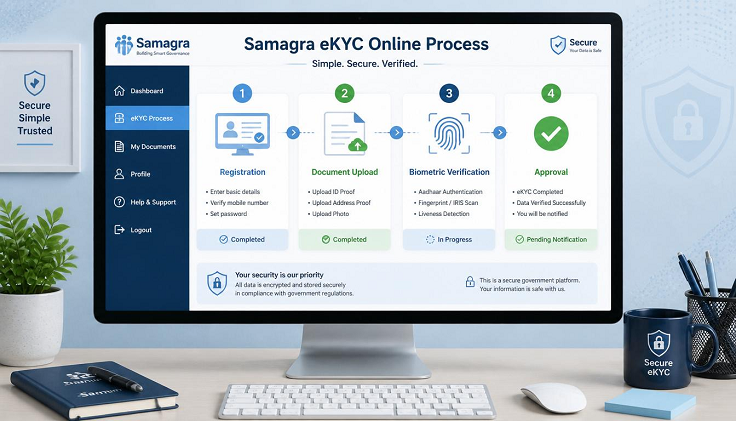
The Samagra eKYC process is an important verification step for residents of Madhya Pradesh. By completing Samagra eKYC online, your Aadhaar gets linked with your Samagra Member ID, allowing the government to verify your identity and provide welfare benefits without delays.
Whether you are applying for scholarships, pensions, ration card services, or other government schemes, completing your Samagra eKYC helps ensure smooth verification and faster approval. This guide explains the complete Samagra eKYC online process, required documents, eligibility, common errors, and their solutions.
What is Samagra eKYC?
Samagra eKYC (Electronic Know Your Customer) is an online identity verification process that links your Aadhaar Card with your Samagra Member ID through UIDAI authentication.
During the verification process, the Samagra Portal checks information such as:
- Name
- Date of Birth
- Gender
- Aadhaar Number
- Address
Once verified, your Samagra profile becomes authenticated and eligible for various government welfare services.
Why is Samagra eKYC Important?
Completing Samagra eKYC offers several benefits.
Access Government Welfare Schemes
Many government schemes now require a verified Samagra profile before benefits are approved.
Faster Scholarship Approval
Students applying for state scholarships often need Aadhaar-linked Samagra records.
Pension Verification
Senior citizens, widows, and differently-abled beneficiaries require verified Samagra details for pension disbursement.
Direct Benefit Transfer (DBT)
Government financial assistance is transferred more efficiently after successful eKYC verification.
Prevent Duplicate Records
Aadhaar verification reduces duplicate registrations and improves data accuracy.
Easy Identity Verification
Government departments can verify your identity instantly using the updated Samagra database.
Documents Required for Samagra eKYC
Before starting the process, keep the following documents ready.
- Samagra Member ID (9-digit)
- Aadhaar Card
- Mobile Number linked with Aadhaar
- Active Internet Connection
- Smartphone, Laptop, or Computer
Make sure your Aadhaar details and Samagra profile contain similar personal information to avoid verification issues.
Eligibility for Samagra eKYC
Generally, the following individuals can complete Samagra eKYC:
- Registered Samagra ID holders
- Madhya Pradesh residents
- Individuals with a valid Aadhaar Card
- Citizens whose mobile number is linked with Aadhaar
How to Complete Samagra eKYC Online
Follow these simple steps to complete the verification process.
Step 1: Visit the Official Samagra Portal
Open the official Samagra Portal in your browser and navigate to the eKYC section.
Step 2: Enter Your Samagra Member ID
Provide your 9-digit Samagra Member ID.
Complete the captcha verification and continue.
Step 3: Verify Your Mobile Number
The portal may send an OTP to your registered mobile number.
Enter the OTP to verify your identity.
Step 4: Enter Aadhaar Number
Now enter your 12-digit Aadhaar Number.
Accept the consent for Aadhaar authentication.
Step 5: Complete Aadhaar OTP Verification
UIDAI will send another OTP to the mobile number linked with your Aadhaar.
Enter the OTP within the specified time.
Step 6: Verify Personal Details
The portal will compare your Samagra information with Aadhaar details.
Verify:
- Name
- Date of Birth
- Gender
- Address
If the information matches, proceed to the next step.
Step 7: Submit eKYC Request
Click Submit to complete the verification request.
An acknowledgement or reference number will be generated.
Save this number for future tracking.
Step 8: Check Samagra eKYC Status
After a few days, visit the portal again and check your eKYC status using:
- Samagra Member ID
- Reference Number
Your status may display as:
- Pending
- Under Verification
- Approved
- Rejected
Once approved, your profile is successfully Aadhaar verified.
How to Complete eKYC for All Family Members
If multiple family members need verification, you can complete the process individually for each registered member.
For every family member:
- Select the Member ID.
- Enter the respective Aadhaar Number.
- Verify using Aadhaar OTP.
- Submit the request.
Each member must complete eKYC separately because Aadhaar verification is individual.
Alternative Methods to Complete Samagra eKYC
Apart from the online portal, citizens can complete eKYC through authorized government service centers.
MP Online Kiosk
Visit your nearest MP Online Center.
The operator will help complete Aadhaar verification for a nominal government-approved fee.
Common Service Centre (CSC)
Authorized CSC operators can also complete the eKYC process.
Panchayat or Municipal Office
Residents can visit:
- Gram Panchayat
- Nagar Parishad
- Municipal Corporation
Officials will assist with Aadhaar verification if required.
Common Samagra eKYC Errors
Some users may experience verification issues during the process.
Aadhaar Authentication Failed
Possible reasons include:
- Incorrect Aadhaar Number
- Name mismatch
- Date of Birth mismatch
- Gender mismatch
Update your Samagra profile before attempting eKYC again.
Mobile Number Not Linked with Aadhaar
OTP verification will not work unless your mobile number is linked with Aadhaar.
Update your mobile number at the nearest Aadhaar Enrollment Centre.
eKYC Already Completed
If the portal displays this message, your profile has already been verified.
You can simply check your verification status.
Approval Delay
Sometimes approval takes longer due to local authority verification.
If the request remains pending for several days, contact your local Samagra office.
Benefits After Successful Samagra eKYC
After completing Aadhaar verification, you can easily access:
- Scholarship Schemes
- Pension Services
- Ration Card Benefits
- Social Welfare Schemes
- Direct Benefit Transfer (DBT)
- Government Subsidies
- Educational Benefits
- Healthcare Assistance
A verified profile also reduces document verification time in future applications.
Safety Tips While Completing Samagra eKYC
To protect your personal information:
- Use only the official Samagra Portal.
- Never share Aadhaar OTP with anyone.
- Avoid unauthorized websites or agents.
- Log out after completing eKYC.
- Keep your acknowledgement number safe.
These precautions help protect your identity and personal data.
Frequently Asked Questions (FAQs)
Is Samagra eKYC mandatory?
Yes. Aadhaar-based eKYC is required for many government welfare schemes and helps ensure faster verification of your Samagra profile.
Which Samagra ID is required for eKYC?
You need your 9-digit Samagra Member ID because Aadhaar verification is completed individually for each family member.
How long does Samagra eKYC approval take?
In most cases, verification is completed within 3 to 7 working days, depending on local authority approval.
Can I complete Samagra eKYC without Aadhaar?
No. Aadhaar authentication is mandatory for completing the Samagra eKYC process.
What should I do if my Aadhaar details do not match Samagra records?
First update your Samagra profile with the correct information. Once the records match, complete the eKYC process again.
Conclusion
Completing Samagra eKYC online is an essential step for every eligible resident of Madhya Pradesh who wants uninterrupted access to government welfare schemes and services. By linking your Aadhaar with your Samagra Member ID, you ensure accurate identity verification, faster approval of scholarships, pensions, ration card benefits, and Direct Benefit Transfer (DBT). Keeping your Aadhaar and Samagra records updated and completing eKYC on time will help you avoid verification delays and continue receiving government benefits without any hassle.